Nextjs에 GA 적용해 유저 행동 분석하기!

· 4 min read

image

일하던 중 동료로부터 질문이 왔다.

"혹시 누구누구 유저가 페이지 방문하고 머문 시간에 대해 알 수 있나요?"

로그를 따로 쌓아두고 있지 않은 시스템에서 현재 데이터베이스에 쌓여 있던 건 페이지 접속했던 시간 뿐이었어서 현재는 접속 시간만 볼 수 있다고 했다. 그래서 많은 로그들을 쌓고 싶은데 그러려면 로그 관리 시스템을 적용해야 하나 생각하다 보니 스케일이 점점 커져갔다. 일단 기본적으로 회사에서 이쪽에 투자를 많이 하는 편이 아니니 무료로 사용하면서 쉽게 적용할 수 있는 방법을 생각해 보다 결국 sentry와 google analytics로 좁혀졌다.

image

sentry는 서비스 단에서 에러 로깅에 자주 쓰이는데, 어떤 기기,  어떤 브라우저가 접속했는지까지 알 수 있고 에러가 생기게 된 이유를 좀 더 순차적으로 보기 편하게 되어 있다. 에러 로깅에 특화되어 있는 느낌이다.

image

구글 애널리틱스는 2020년도에 공식 릴리즈된 사용자 행동 분석 서비스로 유입, 스크롤, 검색, 클릭 등의 이벤트를 자동으로 수집해 주는 원래부터 서비스 운영 시 유저 행동 분석을 위해 만들어진 딱 목적에 맞는 서비스였다. 그래서 구글 애널리틱스로 결정했다.

우선 구글애널리틱스에 접속합니다.

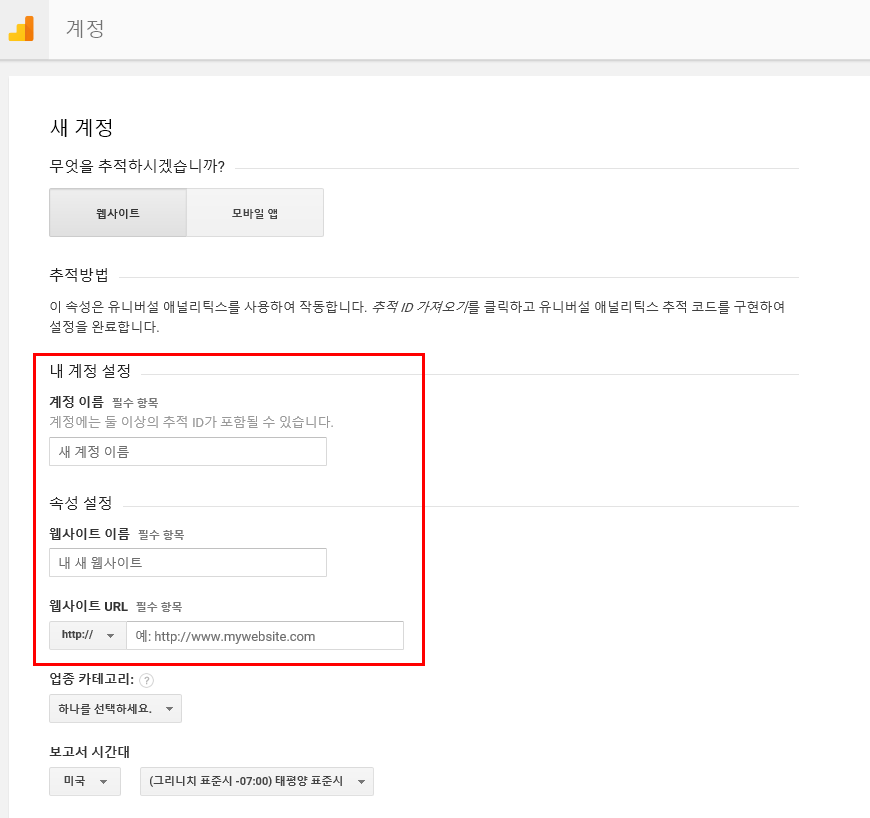
로그인 또는 계정을 만들어 주고 아래와 같이 추적할 웹싸이트 주소를 등록해 주면 됩니다.

image image

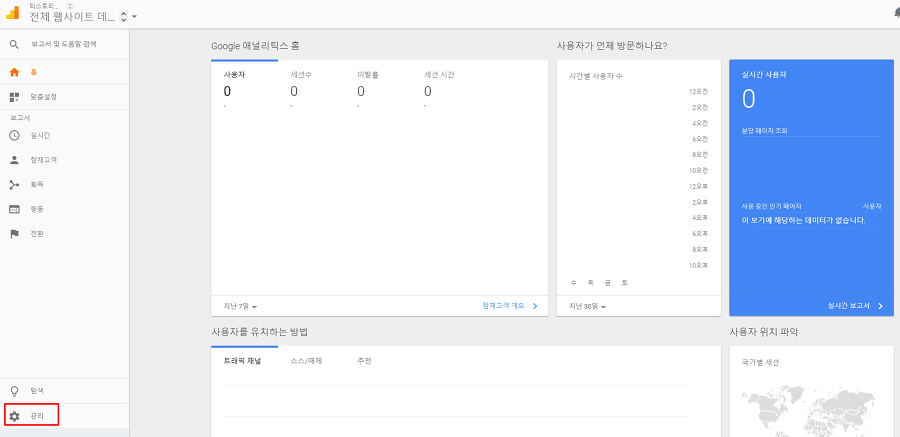
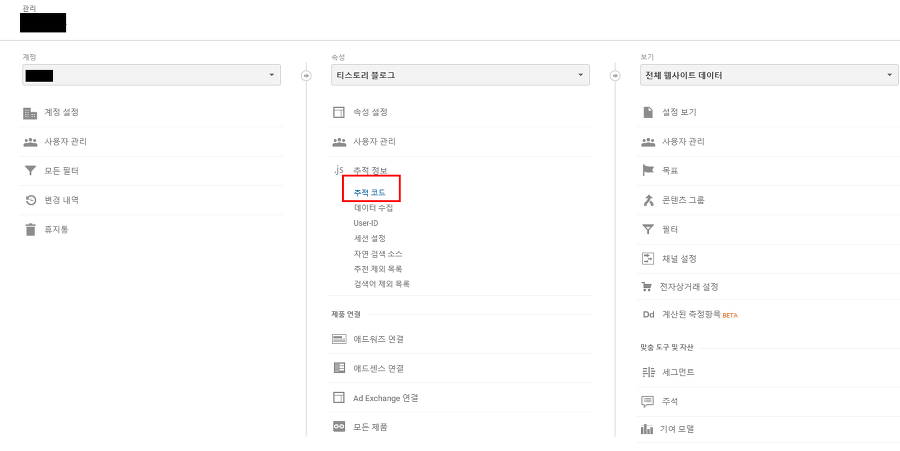
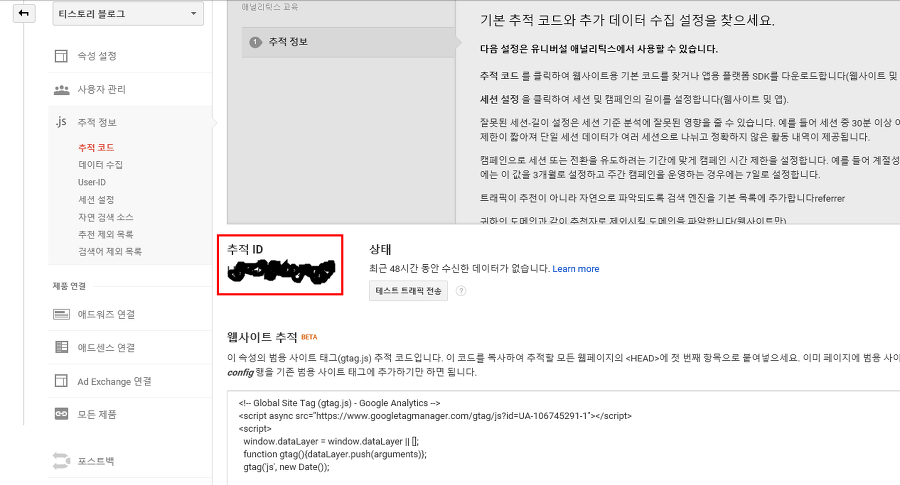
위의 과정을 거치면 아래와 같이 추적 ID를 쉽게 찾을 수 있습니다.

image image image

자! 이제 코드를 살펴보면!

현재 프론트엔드 코드는 Nextjs 기반이고 nodejs 에서 적용할 때는 거의 비슷하니 다른 시스템도 얼추 비슷하게 적용하면 될 걸로 보인다.

빠른 확인을 위해 Vercel 에서 제공하는 nextjs/examples/with-google-analtics를 기반으로 확인해 봤습니다.

우선 .env에 확인한 추적 ID를 NEXT_PUBLIC_GA_ID=<ID>를 넣어주고

lib 폴더를 만들어 안에 gtag.js를 아래와 같이 생성한다.

export const GA_TRACKING_ID = process.env.NEXT_PUBLIC_GA_ID

// https://developers.google.com/analytics/devguides/collection/gtagjs/pages
export const pageview = (url) => {
window.gtag('config', GA_TRACKING_ID, {
page_path: url,
})
}

// https://developers.google.com/analytics/devguides/collection/gtagjs/events
export const event = ({ action, category, label, value }) => {
window.gtag('event', action, {
event_category: category,
event_label: label,
value: value,
})
}

그리고 Nextjs에서는 레이아웃과 같이 공통으로 사용하는 부분을 설정할 수 있는 _app.js가 존재하는데 여기에 아래와 같이 설정해 준다.

import Head from 'next/head'
import { useRouter } from 'next/router'
import Script from 'next/script'
import { useEffect } from 'react'
import * as gtag from '../lib/gtag'

const App = ({ Component, pageProps }) => {
const router = useRouter()
useEffect(() => {
const handleRouteChange = (url) => {
gtag.pageview(url)
}
router.events.on('routeChangeComplete', handleRouteChange)
return () => {
router.events.off('routeChangeComplete', handleRouteChange)
}
}, [router.events])

return (
<>
<Head>
<script
dangerouslySetInnerHTML={{
__html: `
window.dataLayer = window.dataLayer || [];
function gtag(){dataLayer.push(arguments);}
gtag('js', new Date());

gtag('config', '${gtag.GA_TRACKING_ID}', {
page_path: window.location.pathname,
});
`,
}}
/>
</Head>
{/* Global Site Tag (gtag.js) - Google Analytics */}
<Script
strategy="afterInteractive"
src={`https://www.googletagmanager.com/gtag/js?id=${gtag.GA_TRACKING_ID}`}
/>
<Component {...pageProps} />
</>
)
}

export default App

이렇게 되면 페이지 변경할 때 routers.events.on, routers.events.off 일 때 **gtag.pageview(url)**을 통해 페이지 유입, 이탈 유형에 따라 로그를 수집할 수 있다.

image

하단 쪽에 Nextjs에서 제공하는 Script 태그에 stragegy 부분이 있는데, 옵션이 3가지가 있고 각각의 의미는 아래와 같다.

- beforeInteractive

페이지 상호작용하기 전 실행되어야 할 스크립트일 경우

- afterInteractive(default)

태그 매니저나 분석툴처럼 해당 페이지 상호작용 이후 가져와도 되는 경우

- lazyOnload

sns 채팅과 같이 유휴 시간을 기다릴 수 있는 스크립트의 경우

옵션 내용을 보면 알겠지만 afterInteractive를 선택하는 것이 좋다.

여기까지만 해도 유저 행동 분석에 지장이 없다.

추가로 이벤트 로그를 쌓고 싶다면 아래와 같이 초반에 추가해 둔 라이브러리에서 불러와 gtag.event 를 통해 이벤트도 등록할 수 있다.

import { Component } from 'react'
import Page from '../components/Page'

import * as gtag from '../lib/gtag'

export default class Contact extends Component {
state = { message: '' }

handleInput = (e) => {
this.setState({ message: e.target.value })
}

handleSubmit = (e) => {
e.preventDefault()

gtag.event({
action: 'submit_form',
category: 'Contact',
label: this.state.message,
})

this.setState({ message: '' })
}

render() {
return (
<Page>
<h1>This is the Contact page</h1>
<form onSubmit={this.handleSubmit}>
<label>
<span>Message:</span>
<textarea onChange={this.handleInput} value={this.state.message} />
</label>
<button type="submit">submit</button>
</form>
</Page>
)
}
}

이렇게 간단히 페이지 유입, 이탈, 이벤트 등록을 nextjs에 적용할 수 있습니다!

Exception & Error Handling in Python For Professional

· 6 min read

image

System Error 500은 유저의 앱 경험을 방해할 수 있는 오류입니다. Backend에서 항상 유저에게 원활하고 효율적이며 반응성이 좋은 앱을 제공하기 위해 많은 노력들을 기울이지만 예상치 못한 오류를 완전히 피할 수는 없으니 이를 위한 처리꼭 필요합니다.

이러한 오류 처리는 탄탄한 앱을 만드는데 필수적이고 런타임 오류를 예측하는데 도움을 주고 앱의 예기치 못한 동작 오류를 막아줍니다.

이를 위한 오류 처리 방법에 대해 간단히 알아보려고 합니다.

오류의 유형

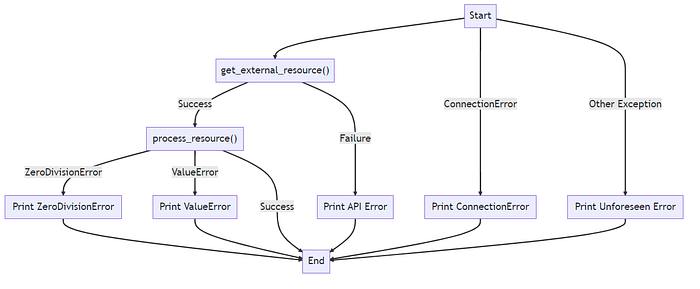
Python에서 오류는 주요 유형으로 3가지로 분류할 수 있는데 Syntax Errors, Runtime Errors, Logic Errors가 있습니다.

Syntax Errors 는 Python의 구문 분석기가 구문 오류를 발견할 때 발생합니다. Runtime Errors 는 프로그램 실행 중 감지된 오류로 프로그램 실행에 문제는 없지만 예외 케이스로 인해 발생한 오류를 말합니다. Logic Errors 는 프로그램의 논리나 알고리즘에 오류가 있는 경우를 말합니다.

그리고 Python에서 오류를 생성할 때 다양한 내장 예외들이 있는데 이름을 찾을 수 없을 때 NameError, 연산이나 함수에 잘못된 타입이 적용됐을 때 TypeError, 함수의 인수가 올바른 타입입지만 값이 잘못 들어오면 ValueError 등이 발생합니다.

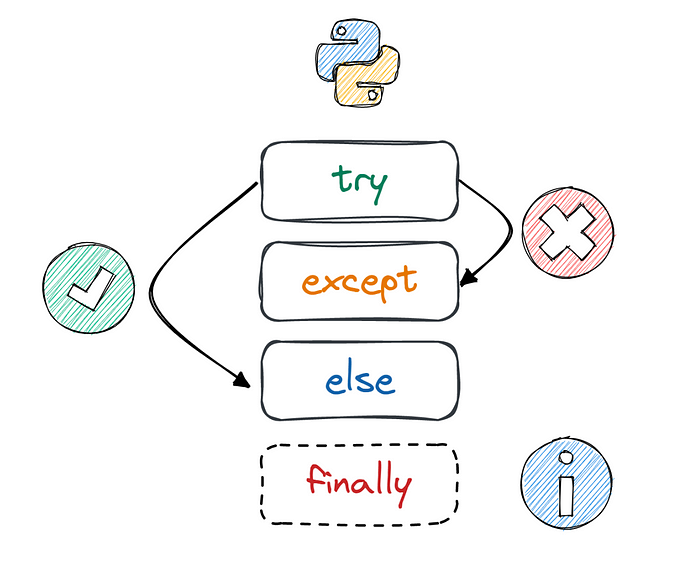
그래서 우리는 아래와 같은 예외처리를 위해 Try-Except 을 사용합니다.

try :
# 예외를 발생시킬 수 있는 코드
x = 1 / 0
Except ZeroDivisionError:
# ZeroDivisionError가 발생하면 실행되는 코드
x = 0
Except TypeError:
# TypeError가 발생하면 실행되는 코드
x = 1

Try-Except 구문은 try 블록 내에 전체 코드를 캡슐화하고 블록 내에서 발생하는 여러 오류 유형에 맞게 오류를 보여줍니다.

image

내장 예외 클래스

위에서 말했던 내장 예외 클래스들은 아래와 같이 있습니다.

  • IOError : 이 예외는 I/O 관련 이유로 I/O 작업(예: print 문, 내장 open() 함수 또는 파일 객체의 메서드)이 실패할 때 발생합니다. 예를 들어 '파일을 찾을 수 없음' 또는 '디스크가 가득 참' 오류가 있습니다.
  • ValueError : 내장 연산이나 함수가 올바른 유형이지만 부적절한 값을 가진 인수를 받으면 발생합니다.
  • ZeroDivisionError : 나누기 또는 모듈로 연산의 두 번째 인수가 0일 때 발생합니다. Python은 0으로 나누는 것이 수학적으로 정의되지 않았기 때문에 이 예외를 발생시킵니다.
  • ImportError : 모듈이 존재하지 않거나 모듈 경로가 올바르지 않아 Python이 가져오려는 모듈을 찾을 수 없는 경우 Python은 ImportError를 발생시킵니다.
  • EOFError : 내장 함수(input() 또는 raw_input()) 중 하나가 데이터를 읽지 않고 파일 끝(EOF) 조건에 도달할 때 발생합니다. 이 오류는 대화형 명령줄 응용 프로그램을 만들 때 가끔 발생합니다.

위의 오류 출력 방법 외에도 모든 예외를 포착하고 싶다면 sys 모듈의 exc_info()를 활용하거나 Except 절의 변수를 두어 print 할 수 있습니다.

- sys.exc_info() 사용

import sys

try :
# 예외를 발생시키는 일부 작업
result = 1 / 0
Except :
exc_type, exc_obj, exc_traceback = sys.exc_info()
print ( f" {exc_type.__name__} 유형의 예외가 발생했습니다. 세부 정보: {exc_obj} " )

- Except 절 변수 사용

try :
# 예외를 발생시키는 일부 작업
result = 1 / 0
Except Exception as e:
print ( f" { type (e).__name__} 유형의 예외가 발생했습니다. 세부 정보: { str (e)} " )

여기까지 예외들에 대해 알아 봤고 이를 핸들링하는 방법들에 대해 알아봤습니다.

요새(이미 핫해진?) FastApi에서 예외 처리하는 방법에 대해 알아봅니다.

간단하게 예외를 처리하고 적절한 http 상태 코드를 반환하는 방법이 있습니다.

from fastapi import HTTPException
class ResourceNotFound(HTTPException):
def __init__(self):
super().__init__(status_code=404, detail="Resource not found")
@app.get("/items/{item_id}")
async def read_item(item_id: str):
if item_id not in items:
raise ResourceNotFound()
return {"item": items[item_id]}

만약 ResourceNotFound 예외가 발생하면 FastApi에서는 상태코드 404와 세부 메시지를 포함한 값을 반환합니다.

이 외에도 미들웨어에 Exception을 잡는 미들웨어를 만들고 추가해 아래와 같이 에러 처리를 하는 방법도 있습니다. 만약 에러가 발생하면 모든 에러를 잡을 것이고 결과로 400 상태코드와 자세한 에러메시지까지 내보냅니다.

from fastapi import FastAPI, Request
from fastapi.responses import JSONResponse

@app.middleware("http")
async def middleware(request: Request, call_next):
try:
response = await call_next(request)
return response
except Exception as e:
return JSONResponse(status_code=400, content={"message": str(e)})

또한 서비스 영역에서도 Exception을 잡는 방법이 있습니다.

아래와 같이 정의하고

class UsernameNotUnique(Exception):
"""Raised when the provided username is not unique"""
def __init__(self, username, message="Username is already in use"):
self.username = username
self.message = message
super().__init__(self.message)

def __str__(self):
return f'{self.username} -> {self.message}'

아래와 같이 발생시킬 수 있습니다.

class UserService:
@staticmethod
async def create_user(db: Session, user: UserCreate) -> User:
db_user = get_user_by_username(db, username=user.username)
if db_user:
raise UsernameNotUnique("Username already taken.")
return create_user(db=db, user=user)

그리고 아래와 같이 잡아낼 수 있습니다.

@app.post("/users/")
async def create_user(user: UserCreate, db: Session = Depends(get_db)):
try:
return UserService.create_user(db, user)
except UsernameNotUnique as e:
raise HTTPException(status_code=400, detail=str(e))

고급 오류 처리 기술

- finally 구문

try-except에서 예외가 발생하더라도 반드시 마지막에는 실행되는 구문입니다.

이 구문을 통해 Backend에서 파일을 열었는데 오류가 발생해 파일을 닫지 못하는 사태를 막을 수 있습니다.

try:
# attempt to open a file and write to it
file = open('test_file.txt', 'w')
file.write('Hello, world!')
except:
print('An error occurred while writing to the file.')
finally:
# this code will run whether an exception was raised or not
file.close()
print('The file has been closed.')

- else 구문 

try-except에서 사용하지만 잘 모르는 else 구문이 있는데 이는 try 구문에서 예외가 발생하지 않는 경우에만 실행되는 구문입니다.

try:
result = 1 / 2 # no exception raised here
except ZeroDivisionError:
print('Divided by zero!')
else:
print(f'The division was successful, and the result is {result}.')

- Contextlib을 활용한 에러 처리

만약 데이터베이스를 연결한다면 에러가 발생하더라도 연결이 종료되는 것을 확인하고 관리할 수 있어야 합니다.

이를 위해 아래와 같이 contextlib.contextmanager 를 활용할 수 있습니다.

from contextlib import contextmanager

class DatabaseConnection:
def __init__(self, name):
self.name = name

def close(self):
print(f"Database {self.name} connection has been closed.")

@contextmanager
def database_connection(name):
db = DatabaseConnection(name) # set up the connection
try:
print(f"Database {db.name} connection has been established.")
yield db # yield control back to the main code
finally:
db.close() # ensure the connection gets closed

with database_connection("test_db") as db:
print(f"Performing operations on {db.name} database.")

 Traceback을 활용해 Debugging 하는 방법

에러가 발생할 때 디버깅이 필요할 때 활용하는 Traceback 모듈이 있습니다.

def function1():
function2()

def function2():
raise Exception('An error occurred')

function1()

이렇게 실행하면 Python에서는 아래와 같이 출력합니다.

Traceback (most recent call last):
File "script.py", line 7, in <module>
function1()
File "script.py", line 2, in function1
function2()
File "script.py", line 5, in function2
raise Exception('An error occurred')
Exception: An error occurred

이것이 Traceback에서 제공하는 출력인데 보면 function1을 실행하면서 function1에서 function2를 실행하고 이것이 function2에서 raise Exception을 몇 번째 라인에서 실행했다는 것까지 자세하게 예외 생성 과정을 출력합니다.

이번에는 모듈을 활용하는 방법입니다.

import traceback

try:
function1()
except Exception:
tb = traceback.format_exc()

print("Here's the traceback:")
print(tb)

FastApi에서 이를 활용하는 방법도 있는데 아주 간단하게 가능합니다.

from fastapi import FastAPI

app = FastAPI(debug=True)

@app.get("/")
def root():
function1()

debug=True만 옵션에 넣어줘도 traceback이 포함됩니다.

결론

Production 코드에서는 예외처리를 통해 유저 경험을 향상시켜줘야 합니다! 또한 데이터 손상이나 손실을 방지하기 위해서도 이는 중요합니다. 오류 처리 기술을 이해하고 구현하면 코드 품질, 사용자 경험 및 유지 관리 가능성을 향상시킬 수 있습니다.

프로그래밍의 다른 측면과 마찬가지로 예외 처리는 지속적인 학습과 개선이 필요한 영역이며, 배우고 적용할 수 있는 새로운 기술, 도구, 모범 사례가 있으니 항상 검색해 보기 바랍니다!

감사합니다!

pd.read_csv(), pd.to_csv() -> Modin 👍

· 2 min read

image

머신러닝을 활용하거나 빅데이터를 다루거나 작은 크롤링 작업을 하다 보면 csv 파일을 많이 이용하게 되는데 이 때 pandas 를 사용하게 되면 pd.read_csv() / pd.to_csv() 명령을 자주 사용하게 된다.

하지만 데이터 사이즈가 커질수록 그 성능 문제가 생기고 많은 시간이 소요되는 등 불편한 점들이 점점 발생한다.

그 한계를 극복하기 위해 분산컴퓨팅 기능을 제공하는 보다 효율적인 새로운 대안을 찾아보게 됐다.

read_csv() 의 경우

import pandas as pd
import dask.dataframe as dd

# Reading a large CSV file with pandas
df_pandas = pd.read_csv('large_dataset.csv')
# Reading the same file with dask
df_dask = dd.read_csv('large_dataset.csv')
# Timing the execution
%timeit df_pandas.head()
%timeit df_dask.head()

위에는 dask를 활용한 예시인데 데이터 사이즈가 클수록 더 많은 시간을 줄일 수 있다. 

to_csv() 의 경우

import pandas as pd
import fastparquet

# Saving a DataFrame to a Parquet file
df = pd.DataFrame({'column1': [1, 2, 3], 'column2': ['a', 'b', 'c']})
fastparquet.write('output.parquet', df)

위와 같이 fastparquet을 활용해 공간 및 성능 효율적으로 실행할 수 있다.

설명한 것처럼 여러가지 방법들이 많지만 Modin에 대해 알아보게 됐습니다!

Modin으로 csv를 읽어오는 법

import modin.pandas as pd

# Reading a CSV file with Modin
df = pd.read_csv('data.csv')

단순히 pandas 를 위와 같이 대체만 해줘도 되는 쉬운 방식으로 성능적이 이득을 얻을 수 있다.

Modin으로 csv를 쓰는 법

import modin.pandas as pd

# Create a sample DataFrame
df = pd.DataFrame({'column1': [1, 2, 3], 'column2': ['a', 'b', 'c']})
# Writing the DataFrame to a CSV file with Modin
df.to_csv('output.csv', index=False)

파일을 쓰는 법도 읽어오는 것처럼 대체만 해주면 바로 사용이 가능하고 훨씬 빠르고 효율적으로 저장할 수 있다.

이처럼 많은 대체 방법 중 Modin을 소개하는 것은 modin.pandas만 해주면 코드를 수정하지 않아도 이용할 수 있기 때문이다.

만약 pandas 만의 고유 기능이 있어 다시 pandas 를 사용하고 싶다면 아래와 같이 간단히 switching 할 수 있다.

import modin.pandas as pd

# Reading a CSV file with Modin
df = pd.read_csv('data.csv')
# Perform some data analysis with Modin
# Switch to pandas
df = df.__pandas__()
# Continue working with pandas
df.head()

결론

라이브러리들은 계속 발전하고 여러가지 대체 방법들은 계속 나오고 있으니 pandas 로 막힌다면 다른 방법들을 찾아 스터디해 보는 것도 좋을 것 같다.

Flutter vs React Native - 2023

· 4 min read

image

모바일 앱을 개발하는 방법은 보통 3가지로 나뉜다.

1. 네이티브 앱

2. 하이브리드 앱

3. 크로스플랫폼 앱

image

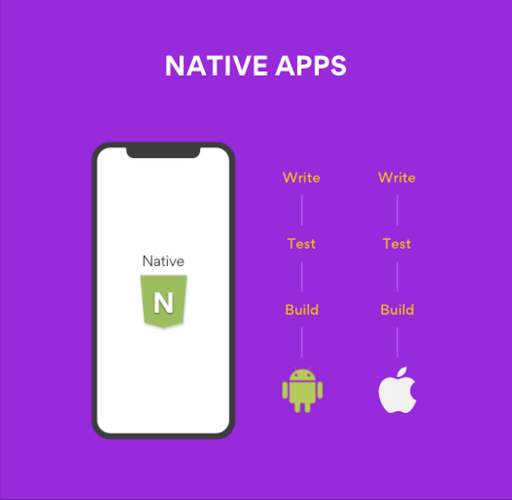
네이티브앱은 예전부터 앱 개발 시에 aos(android), ios 에 맞춰 다른 언어로 그 언어에 맞게 각각 개발하는 방법이 있다.

이 방식은 1개의 앱을 개발하기 위해 두 개의 언어를 모두 할 줄 알아야 해서 보통 개발자를 2명 뽑아 운영하게 되고 동일한 화면을 구글플레이, 앱스토어에 각각 배포하기 위해 모두 새로 만들어줘야 하는 중복 작업이 필요하다.

대신 os 언어에 맞게 개발하기 때문에 좀 더 deep한 기능을 넣어줄 수 있다고 하는데 요새는 그게 그렇게 중요한가 싶다.

image

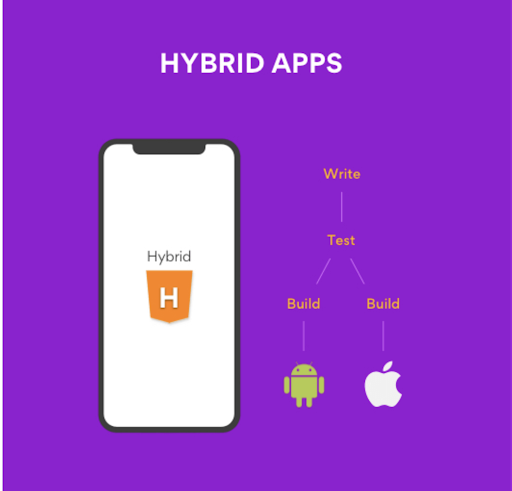
하이브리드 앱은 각각의 os 별로 웹 페이지를 보여주기 위한 웹뷰 기능을 제공하는데 이 기능을 이용하는 방식이다.

실제 모바일 앱의 화면을 모두 웹싸이트로 구현하고 앱 개발은 웹뷰로 보여주는 정도로만 개발한다. 네이티브 기능이 필요하다면 이 또한 웹뷰 또는 백엔드와 상호작용해 얻을 수 있어 개발이 간편하다.

초기 셋팅을 해 둔다면 웹 개발자만으로 앱을 운영할 수 있고 웹페이지를 보여주기 때문에 스토어에 배포를 자주하지 않고 웹싸이트만 따로 배포해도 업그레이드 할 수 있는 장점이 있다. 하지만 웹뷰앱은 스토어에서 관리하기 힘든 단점이 있어 앱스토어나 구글플레이에서 좋아하는 방식이 아니다. 그래서 점점 불리하게 업그레이드 되는 것 같다.(개인적 생각..)

image

대망의 크로스플랫폼 앱은 하나의 코드 베이스로 대부분의 네이티브 기능들을 사용할 수 있도록 만들어진 방식이다.

하이브리드 앱도 하나의 코드베이스로 운영되긴 하지만 네이티브 요소들이 필요할 때는 native app 언어를 공부해야 하고 가끔 웹으로 앱을 구현할 때 있어서의 UI 또는 기능적 한계에 부딪친다.

크로스플랫폼 앱은 네이티브를 사용하기 때문에 하이브리드 앱 보다 유용하고 하나의 언어와 플랫폼을 사용하기 때문에 코드를 중복해서 만들어야 하는 불편함도 줄여준다.

기업에서도 개발자 2명 뽑을 걸 1명만 뽑아도 되서 이득, 개발자도 개발산출물의 코드 베이스가 하나이기 때문에 관리도 편하고 모두에게 이득이 아닌가 싶다.

이렇게 좋은 크로스플랫폼의 가장 인기있는 RN(react-native)와 flutter에 대해 알아보려고 한다.

image

우선 RN은 2015년에 meta(구 facebook)에서 개발했고 웹 개발자들에게 친숙한 react 프레임워크와 거의 비슷하게 사용할 수 있다.(js만 사용해 모바일 앱 개발 가능 👍)

웹 개발자만 있으면 web, aos, ios앱도 모두 만들 수 있으니 매우 효율적이다. 물론 기존 react와 똑같지는 않고 사용하는 라이브러리나 html, css 방식이나 UI 구성 방식은 다르지만 그래도 웹개발자들에게 친근해 많이들 사용했다.

image

flutter는 2017년에 google에서 개발했고 dart 언어를 활용해 aos, ios, web, window, mac 등 거의 모든 플랫폼 앱에 대한 개발이 가능하도록 되어 있다. dart 언어를 이해하고 flutter 사용 방법만 익숙해 진다면 더 많은 혜택을 누릴 수 있다. 하지만 상대적으로 js사용자가 많은 개발자 생태계에서 dart 언어의 경쟁력이 좀 떨어지고 친근함도 떨어져 RN보다는 초기 진입장벽이 있다고 볼 수 있다.

image

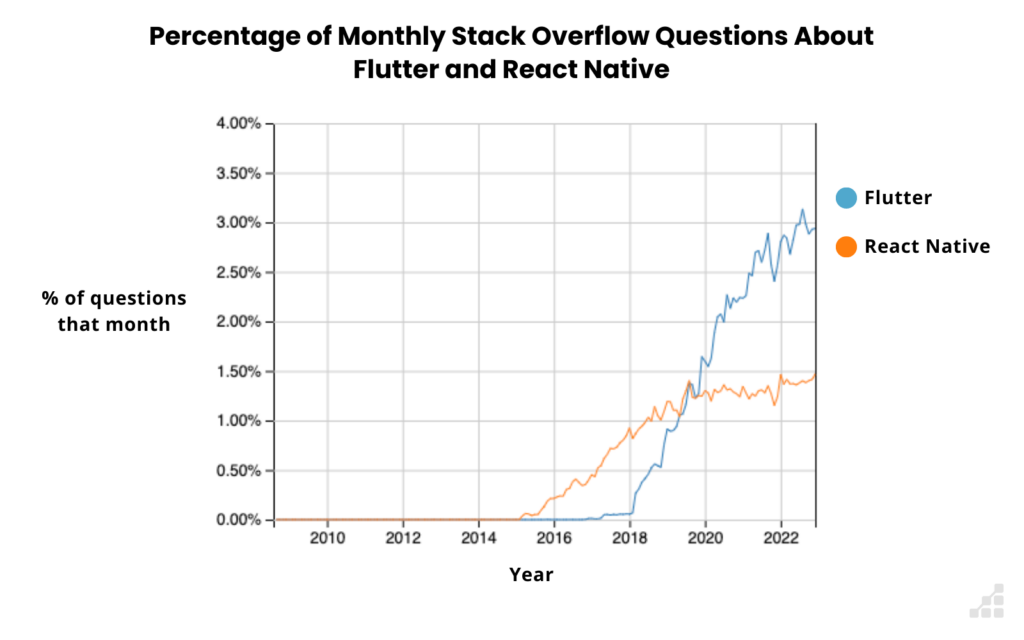
비교를 시작하자면 개발자들 간 지식인 싸이트인 Stack Overflow에서 보면 RN이 먼저 출시했고 친근함을 무기로 많은 성장을 했지만 사람들의 관심도가 점점 flutter로 옮겨가는 것을 볼 수 있다. 결국 2019~2020년 사이에 flutter가 더 많이 관심 받기 시작한 걸로 보인다.

이미 여러 그래프들에서 개발자들이 사용하고 싶은 프레임워크부터 인기 그래프 등에서 flutter가 2021년 이후로는 확실히 앞서기 시작하는데 왜 이런 변화가 일어났을까?

둘 다 사용해 본 경험을 말해보자면 우선 언어적으로는 js가 더 친근하지만 dart가 어려운 언어가 아니기에 접근하기가 어렵지 않았다는 것이 있고 초기 셋팅 시 flutter가 cli가 훨씬 잘 되어 있어 셋팅이 편리했고 심지어는 초기 셋팅만 cli가 편한 것이 아니라 라이브러리 설치부터 개발까지도 친숙하지 않은 것일 뿐 훨씬 더 편리하다는 것.

RN을 이용하면서 가장 불편했던 건 라이브러리 설치 적용, 초기 셋팅 등이다. 친숙한 언어와 프레임워크가 개발에 있어 속도를 낼 수 있게 해주지만 셋팅할 때마다 생기는 오류들로 벌어둔 시간을 다 까먹게 된다.

flutter는 그에 반해 dart 언어, 프레임워크 사용법만 익혀두면 그 이후 개발은 훨씬 더 편하다. flutter 자체에서 대부분의 라이브러리를 지원하고 문서도 간소화 되어 읽기 편하게 되어 있다.  그리고 요즘 개발에 맞게 react가 컴포넌트 단위의 개발을 하는 것처럼 flutter는 widget 단위로 개발해 재사용하기도 편리하다.

게다가 RN은 js를 활용한 브리지를 통해 기본 구성 요소에 연결하므로 개발 속도나 실행 시간이 flutter 보다 느린 편이고 flutter는 브리지에 의존하지 않고 전용 그래픽 머신을 통해 앱과 상호작용하기 때문에 네이티브 코드로 컴파일해 성능이 훨씬 빠르다.

그리고 디버깅도 쉽게 할 수 있도록 완전히 지원되어 있어 개발 중 수 많은 디버깅에 있어서도 유리합니다.

너무 flutter 편향적으로 적긴 했지만 이런 flutter 움직임에 RN도 자극을 받았는지 성능 업그레이드도 되었고 여러 문제들이 개선되고 있고 기존의 많은 회사들이 채택해 사용하고 있기 때문에 사실 결국에 누가 우위를 점할지는 알 수 없는 상황이긴 하다.

하지만 그 간 RN을 하며 겪었던 고생들을 flutter를 통해 해소하고 나니 RN에 대한 감정이 남아 있다.

다시 좋은 감정을 가지고 RN을 겪어보고 싶은 마음도 남아 있다.

How to Solve HTTPConnectionPool Error In Python

· 2 min read
Alex Han
Software Engineer

image

개발을 하다 보면 많은 API를 다루게 된다.

많은 개발자들이 API를 통해 원하는 데이터를 쉽게 가져오고 이를 활용한다.

그리고 python을 이용한다면 간단하게 requests를 import 해서 사용할 것이다.

image

API가 기능을 대신해 줘서 사용하는 경우도 있지만 별다른 기능없이 가진 데이터 자체만 제공해주는 경우도 있다. 

예를 들어 영화 정보 제공이라든지, 날씨 정보 제공이라든지 이런 경우다.

근데 만약 그 API에서 가진 모든 영화정보를 요청해 이 데이터를 나만의 데이터베이스로 구축해 자산화하고 싶다면,

모든 영화의 각각의 상세정보를 불러올 수 있는 키값 목록을 가져오고 가져온 키값 목록을 이용해 loop를 돌며 아주 방대한 요청을 진행해야 할 것이다.

image

이 때, 공급하는 서버에 무리를 덜 주기 위해 from time import sleep으로 sleep(0.5) 이런 식으로 서버에게 부담을 덜 주는 방법도 있지만, 자주 발생하는 건 HTTPSConnectionPool 에러가 자주 발생한다. 이 에러의 내용을 살펴보면 Max retries exceeded with url 이런 식으로 뒤에 적혀 있어 내가 너무 자주 요청해서 날 블록한건가 싶은 생각이 들지만 그런 경우도 있고 아닌 경우도 있다.

더 뒤에 내용에 SSLError라는 말이 붙는다면 requests.get('<URL>', verify=False) 이런 식으로 verify하지 않도록 옵션을 준다면 해결이 된다! 🚀 (검색해 보니 근본적 해결을 위해 pyOpenSSL을 업데이트 해주면 된다고 해서 업데이트 해봤지만 별 소용이 없었고 이미 업데이트된 상태였다...😭)

그리고 만약 뒤에 refuse ... server 이런 늬앙스의 글귀가 보인다면 조금 기다렸다가 다시 요청해 보면 잘 될 확률이 높다.⭐️

(제공자가 블랙리스트화해서 요청을 막는 옵션을 두지 않았다면의 가정)

image

이렇게만 하면 모든 문제가 해결될 것 같다고 착각했지만 몇 십만번 요청하다 보니 상대 서버에서도 부담을 느낀 듯 하다.

어느 순간 병목현상처럼 요청을 했는데 서버에서 결과를 주지 않는다. 오류인지 성공인지도 답이 없고 몇 시간이 지나도 답이 없다...

이런 경우 계속 기다리면 영원히 기다려야 할 수 있다😱

requests.get('<URL>', verify=False, timeout=10) 이런 식으로 timeout을 줘서 API 용량이 어느정도 올거고 정상적인 상태에서 대기해 줄 만한 초를 정해 파라미터에 넣어주면 영원한 기다림에서 쿨한 기다림으로 바꿔준다.

image

이렇게 쿨한 마무리!

윈도우, 리눅스 서버 접속(ssh, rdp) 보안

· 6 min read
Alex Han
Software Engineer

image

IT쪽 일을 하다 보니 랜섬웨어 감염이라는 끔찍한 일을 겪게 됐고 앞으로 이런 일이 발생하지 않도록 대응책을 찾게 됐다.

물론 애초에 클라우드 아키텍쳐를 보안이 좋도록 서버와 코드 구성 등 많은 부분을 고칠 수 있지만 현재 회사에서는 그런 시도를 자유롭게 할 수 없는 환경이기에 다른 방법들을 찾기 시작했다.

이 포스트에서는 윈도우 서버와 리눅스 서버의 접속 관련 보안 방법인 IP 접속 제한, 계정 접속 시도 횟수 설정, 방화벽 설정 등에 대해 알아본다.

image

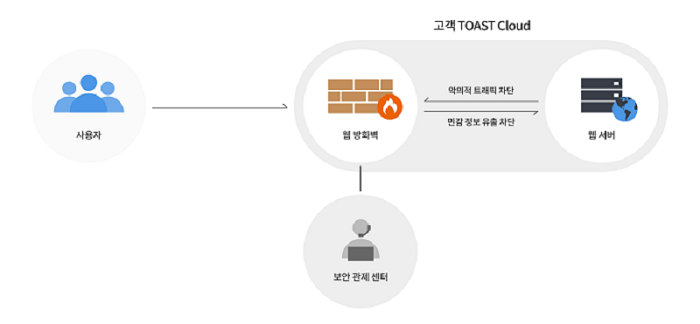
우선 클라우드를 이용하고 있다면 클라우드의 우리 서버까지 도달하기까지 클라우드에서 운영중인 방화벽이 따로 존재한다.

이 방화벽은 경비원과 같은 역활을 한다. 우리 서버가 통신 시 항상 거치는 곳이기 때문에 통신을 제한할 수 있다.

서버로부터 나가는 통신, 서버로 들어오는 통신 등을 설정해 보안을 강화할 수 있다.(여기서 ip 통제) 

그리고 보통 이 방화벽을 클라우드 관제센터에서 모니터링하기 때문에 문제 발생도 잡아주기 때문에 좋다.(하지만 모든 클라우드에서 지원해주지는 않음)

image

우선 고성능의 윈도우 서버에 RDP 구성 시 OS 레벨에서의 접속 보안 방법에 대해 먼저 생각해 보자!

윈도우의 기본 RDP 접속 포트는 3389포트다. 그래서 해킹시도 시 가장 먼저 열려있는 포트를 확인하기 위해 시도해 보게 된다.

그렇기 때문에 남들이 알아차리기 힘든 RDP 접속 포트로 원격 데스크톱의 수신 대기 포트를 변경해 이런 시도를 무산시킬 수 있다.

레지스트리를 변경하여 수행할 수 있는데 아래와 같은 순서로 실행하면 된다.

  1. 레지스트리 편집기를 시작합니다. (검색 상자에 regedit을 입력합니다.)
  2. 다음 레지스트리 하위 키로 이동합니다. HKEY_LOCAL_MACHINE\System\CurrentControlSet\Control\Terminal Server\WinStations\RDP-Tcp
  3. PortNumber를 찾습니다.
  4. 편집 > 수정을 클릭하고 Decimal을 클릭합니다.
  5. 새 포트 번호를 입력하고 확인을 클릭합니다.
  6. 레지스트리 편집기를 닫고 컴퓨터를 다시 시작합니다.
  7. 방화벽을 사용하는 경우 새 포트 번호로의 연결을 허용하도록 방화벽을 구성해야 합니다.
Get-ItemProperty -Path 'HKLM:\\SYSTEM\\CurrentControlSet\\Control\\Terminal Server\\WinStations\\RDP-Tcp' -name "PortNumber"

예를 들어:다음 PowerShell 명령을 실행하여 RDP 포트를 확인할 수도 있습니다. 이 명령에서는 새 RDP 포트를 3390으로 지정합니다.

$portvalue = 3390

Set-ItemProperty -Path 'HKLM:\\SYSTEM\\CurrentControlSet\\Control\\Terminal Server\\WinStations\\RDP-Tcp' -name "PortNumber" -Value $portvalue

New-NetFirewallRule -DisplayName 'RDPPORTLatest-TCP-In' -Profile 'Public' -Direction Inbound -Action Allow -Protocol TCP -LocalPort $portvalue
New-NetFirewallRule -DisplayName 'RDPPORTLatest-UDP-In' -Profile 'Public' -Direction Inbound -Action Allow -Protocol UDP -LocalPort $portvalue

image

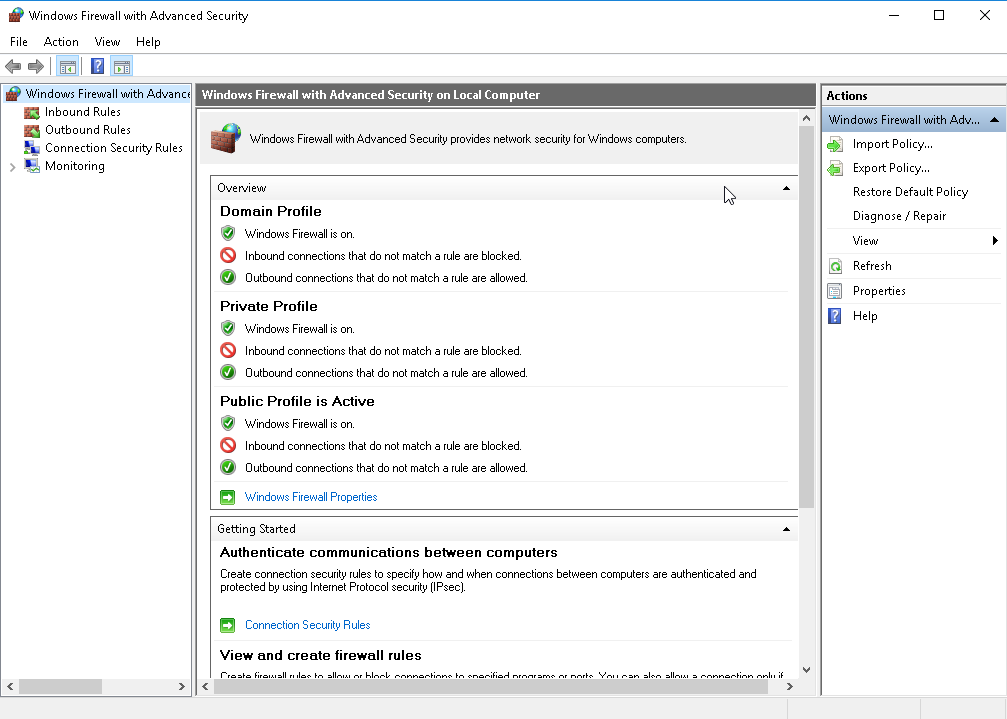
두번째 보안 방법으로 방화벽을 활용해 IP를 통제하는 방법이다. 그 방법은 아래와 같다.

  1. 서버 연결
  2. 방화벽 설정인바운드 규칙 클릭 → 오른쪽에서원격 데스크톱 – 사용자 모드 (TCP-In) 규칙을 찾는다.
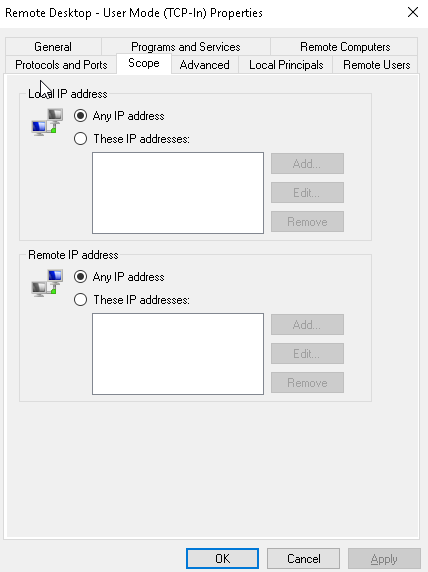
  3. 찾은 규칙에서 마우스 오른쪽 클릭해속성 클릭,****범위탭으로 가서 서버에 액세스하려는 IP 주소와 범위를 추가

image image

세번째로 원격 엑세스에 사용하는 계정에 대해 접속 시도 실패 시에 잠금을 설정하는 방법이 있다.

만약 이 설정이 되어 있지 않다면 해커들은 수 많은 경우의 수를 모두 시도해 봐도 계정을 계속 사용할 수 있기 때문에 시간만 주어진다면 언젠가는 접속할 수 있게 된다.(패스워드 복잡도에 따라 그 시간이 큰 차이가 생김)

아무튼 원격 액세스 클라이언트 계정 잠금을 활성화하고 시간을 다시 설정하려면 다음 단계를 수행합니다.

  1. 시작 → 열기 →*regedit*한 다음 Enter
  2. 레지스트리 키 선택
  3. HKEY_LOCAL_MACHINE\\SYSTEM\\CurrentControlSet\\Services\\RemoteAccess\\Parameters\\AccountLockout
  4. MaxDenials를 더블 클릭
  5. 기본값은 0이고 0일 경우 계정 잠금이 해제됨을 의미. 계정을 잠글 때 로그인 시도 실패에 대한 횟수를 설정하고 확인
  6. ResetTime(분) 값을 두 번 클릭합니다.
  7. 기본값은 2,880분(2일) 동안 16진수인 0xb40 . 네트워크 보안 요구 사항을 충족하도록 수정 후 확인
  8. 레지스트리 편집기 종료

만약 계정이 잠긴 경우 위에서 설정한 ResetTime에 따라 사용자가 다시 로그온 가능하지만 바로 원할 경우 레지스트리 키에서 DomainName:UserName 값을 삭제할 수 있는 방법은 아래와 같다.

  1. **시작 → 열기 →**regedit한 다음 Enter
  2. 레지스트리 키 선택
  3. HKEY_LOCAL_MACHINE\\SYSTEM\\CurrentControlSet\\Services\\RemoteAccess\\Parameters\\AccountLockout
  4. 도메인 이름:사용자 이름 값을 찾은 다음 항목을 삭제
  5. 레지스트리 편집기 종료
  6. 계정을 테스트 해 더 이상 잠기지 않는지 확인

---------------------------------------------WINDOW END---------------------------------------------------

image

여기서부터 리눅스 접속 관련 보안에 대해 생각해 보자!

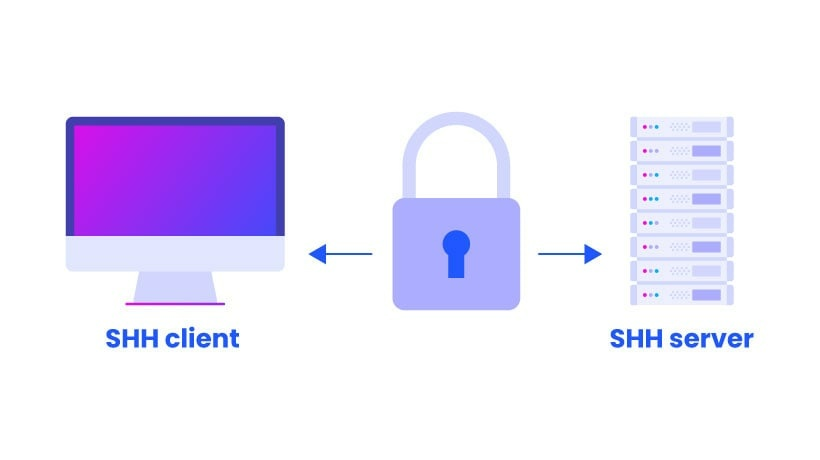
리눅스 접속 중 SSH에 대해 알아볼 예정인데 SSH 서버 관련 설정은 기본으로 되어 있는 곳이 많다.

카페24, 가비아, AWS, Azure, GCP 등은 모두 SSH 서비스를 기본으로 제공하고 최신판 리눅스들은 대부분 SSH 서버를 기본 탑재하고 있다.

rpm -qa | grep openssh-server 를 터미널에 입력해 설치되어 있는지 체크해 볼 수도 있고, 만약 설치되어 있지 않다면 yum install openssh-server (CentOS, RedHat Enterprise), apt install openssh-server (Ubuntu, Debian) 으로 설치한 뒤 which sshd 를 통해 설치 경로를 확인해 볼 수도 있다. 그런 뒤 방화벽 설정 프로그램에서 tcp 22 포트를 허용해 주면 된다.(root 권한 필요)

그 방법은 아래와 같다.

  1. iptables의 경우 - iptables -A INPUT -p tcp -m tcp --dport 22 -j ACCEPT
  2. firewalld의 경우(CentOS 7이상) - firewall-cmd --zone=public --add-port=22/tcp —permanent
  3. ufw의 경우(ubuntu) - ufw allow 22/tcp

ssh 설정은 보통  /etc/sshd/sshd_config 여기서 설정할 수 있고 여기서 아래와 같은 설정도 할 수 있다.

  1. SSH 포트 변경
  2. 접속 허용 클라이언트 및 패스워드 입력 시도 횟수 제한 설정
  3. 패스워드, 공개 키 사용자 인증 설정
  4. 접속 로그, 배너 메시지

설정이 끝나면 service sshd start 또는 systemctl start sshd 를 통해 실행해 주면 된다.

image

SSH 보안 관련 설정은 /etc/sshd/sshd_config 에서 하게 된다.

우선 리눅스 서버에서 root 권한은 윈도우에서의 관리자 권한처럼 위험하다.

그래서 애초에 root 로 접속하는 것을 막는 것이 보안상 권장된다.

다른 계정으로 접속해 root 권한을 얻어 사용하는 것이 좀 더 바람직하다.

이 때 사용하는 파라미터가 PermitRootLogin 인데 아래와 같은 옵션이 있다.

  1. PermitRootLogin yes - root 로그인 허용
  2. PermitRootLogin no - root 로그인 차단
  3. PermitRootLogin without-password(최신 openssh에서 prohibit-password로 변경됨) - password가 아닌 공개 키 인증으로만 접속

말했던 것처럼 2번을 사용하면 된다.

그 외에도 윈도우에서 했던 것처럼 접속 시도 실패 횟수를 카운트 해 막아주는 방법은 MaxAuthTries 파라미터를 활용하면 되는데,

MaxAuthTries 6 - 계정 당 최대 연결 시도 횟수로 6인 경우 6번을 뜻하고 6번부터 계정이 막히는 것을 알 수 있다.

그 외에도 LoginGraceTime 2m - 사용자 인증 요청받을 수 있는 최대 시간 설정(2m은 2분)과 MasSessions 10 - SSH 연결 허용할 최대 클라이언트 수 등 여러 파라미터들이 존재하고 보안에 유리하게 조율하면 된다.

How To Move Database Files To New Volume In MSSQL Server

· 3 min read
Alex Han
Software Engineer

image

IT 계열로 넘어온 후 스타트업을 전전하다가 재택근무를 위해 이직을 하다가 갑자기 꽤 큰 규모의 회사에 들어왔다.

스타트업은 개발자들이 입사를 잘 하지 않아 생각보다 많은 우대를 해줬구나를 느낀다. 

지금 다니는 회사는 개발이 메인인 회사가 아니다 보니 사실 서비스를 엑셀로도 제공하기도 하고 그런다...;

스타트업에서는 돈을 아끼기 위해서인지 무료 데이터베이스들만 사용해 왔다. Postgresql, Mysql, MongoDB 이런 데이터베이스들에 익숙해진 상태였다. 서버도 항상 리눅스 계열의 서버만 이용했고 사실 그마저도 중요하지 않았던 건 데이터베이스들은 매니지드 데이터베이스 서비스들을 이용해 와서 알아서 관리되고 있었고 가끔 복구가 필요할 때 주기적으로 스냅샷 저장해 둔 것을 토대로 복구하면 됐다.

그러나 이 회사는 내가 해 온 개발과 결이 많이 달랐다. 모든 것이 수동이다. 데이터베이스 서버 구성도 수동으로 EC2 같은 서버를 띄워두고 데이터베이스도 볼륨에 저장해 둔 뒤 용량이 가득차면 새 볼륨을 만들어 다른 볼륨에 추가해주는 방식으로 운영되어 왔다.

이것 외에도 파일 storage를 따로 두지 않고 EC2 서버에 저장해 가며 쓰는 방식도, 사람들마다 다른 언어로 만들어 놓은 개발 구조도 모든 구조를 새로 마이그레이션 해야 하지만 그 이전에 운영을 위해 용량이 가득 찬 드라이브의 데이터베이스 파일들을 신규 드라이브에 옮겨 다시 데이터베이스와 연결해 주는 작업을 해야 했다.

image

먼저 해야 할 일은 클라우드 대시보드에서 볼륨을 추가해 주고 서버와 그 볼륨을 연결해 주는 작업이다. 이런 작업들은 대시보드를 제공하는 회사들에서는 메뉴얼로 제공해주는 형태가 보통이기 때문에 그리 어렵지 않게 해결된다.

image

이제 윈도우 서버로 돌아가보자. 윈도우 서버에서 제어판을 열고 관리도구 -> 컴퓨터 관리 -> 저장소 -> 디스크 관리 순서대로 따라 오면 방금 전 대시보드에서 추가한 신규 볼륨이 보입니다.

그럼 해당 디스크는 컴퓨터 입장에서 신규로 생긴 디스크이니 디스크 초기화 및 할당을 통해 내 컴퓨터에서 들어갈 수 있도록 만듭니다.

image

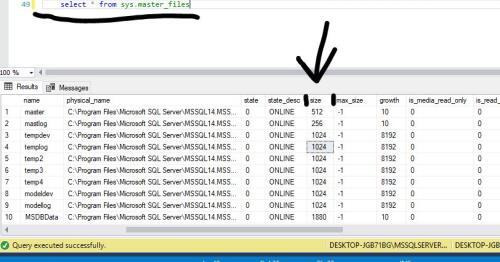
데이터베이스를 다시 살펴보면 sys.master_files 테이블을 조회해 보자. 여기서는 데이터베이스에 연결된 모든 파일들의 정보를 확인할 수 있다. 간단하게는 용량이 부족하다는 것을 알게 된 데이터베이스에서 마우스 오른쪽 클릭해 속성에 들어가면 어떤 파일에 연결되어 있고 max_size가 unlimited인지 limited인지 알 수 있다. (limited라면 디스크 용량을 확인하고 unlimited로 변경해 더 많이 디스크에 할당하면 됨)

일단 unlimited 상태라서 자동으로 디스크 할당이 증가하지만 그 디스크 용량 자체가 가득 찬 상태

라면 더 이상 늘릴 수 없는 상태가 된다.

이제 새로 생성한 볼륨에 데이터베이스 파일들(mdf, ldf)을 복사해 줄 때가 됐다. 

image

우선 사전준비를 시작하자!

아까 확인한 데이터베이스 파일들이 있는 위치로 이동하고 새 디렉토리를 열어 데이터베이스 파일들을 옮길 폴더의 위치로 이동한다.

데이터베이스 파일들을 옮길 폴더 위에 마우스 오른쪽을 클릭해 속성 -> advanced -> security 에서 유저를 추가해 준다.

유저 추가 시 NT SERVICE\MSSQLSERVER 입력 후 이름 확인 후 OK 하고 적용해 준다.

그리고 복사하기 이전에 다시 데이터베이스 클라이언트로 가서 아래와 같이 코드를 입력해 준다.

# master로 실행해야 함
USE master
# 우선 데이터베이스를 오프라인시킴
ALTER DATABASE [데이터베이스 이름] SET OFFLINE
# 파일 위치를 변경함. 위의 과정 중 SQL에서 확인된 FileLogicalName을 활용해 이름 입력.
# 그리고 실제 복사한 데이터베이스 파일들의 속성 / advanced 에서 compress contents to save disk space 를 체크해제 해주는 것도 꼭 해야 함.
ALTER DATABASE [데이터베이스 이름] MODIFY FILE ( NAME='[데이터베이스 이름]', FILENAME='G:\SQLServer\DATA\[데이터베이스 이름].mdf' )
ALTER DATABASE [데이터베이스 이름] MODIFY FILE ( NAME='[데이터베이스 이름]_log', FILENAME='G:\SQLServer\DATA\[데이터베이스 이름]_log.ldf' )
# 데이터베이스 원상복귀
ALTER DATABASE [데이터베이스 이름] SET ONLINE;

이제 위의 코드에서 데이터베이스 오프라인까지 진행한 뒤,

원하는 폴더로 데이터베이스 파일들을 복사해 준다. 복사한 데이터베이스 파일들에서 하나씩 마우스 오른쪽을 클릭해 속성 -> advanced에서 compress contents to save disk space 를 체크 해제해 준다.

그런 뒤 위의 남은 쿼리들을 실행시켜 다시 정상화 해준다.

생각보다 간단하게 마무리 됐지만 데이터베이스 파일들을 옮겨 보는 일은 처음이고 데이터베이스 작업은 항상 신중히 진행해야 하기 때문에 시간이 오래 걸렸다. 다른 사람들은 이런 수고를 덜었으면 좋겠다.

윈도우 서버 원격 접속 사용자 계정 설정하기(Windows Server Remote Access User Account Settings)

· 3 min read
Alex Han
Software Engineer

image

개발자로 회사 생활을 하다 보니 윈도우 서버도 운영해 보게 됐다.

그 동안 윈도우 서버를 사용해 본 경험이 없다가 Spotfire 라는 software를 사용하면서 windows에서만 돌아가는 프로그램을 운영하게 되면서 windows를 사용하게 되는데 여러 명이 windows에 원격으로 접속해 작업할 수 있는 작업용 서버 환경을 만들어야 했다.

생각보다 그 과정이 아주 간단하다.

윈도우 원격 접속 사용자 추가

image

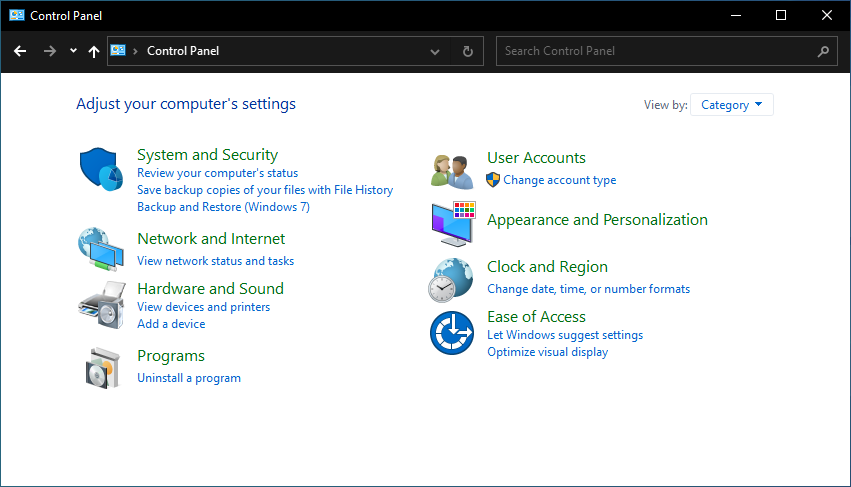
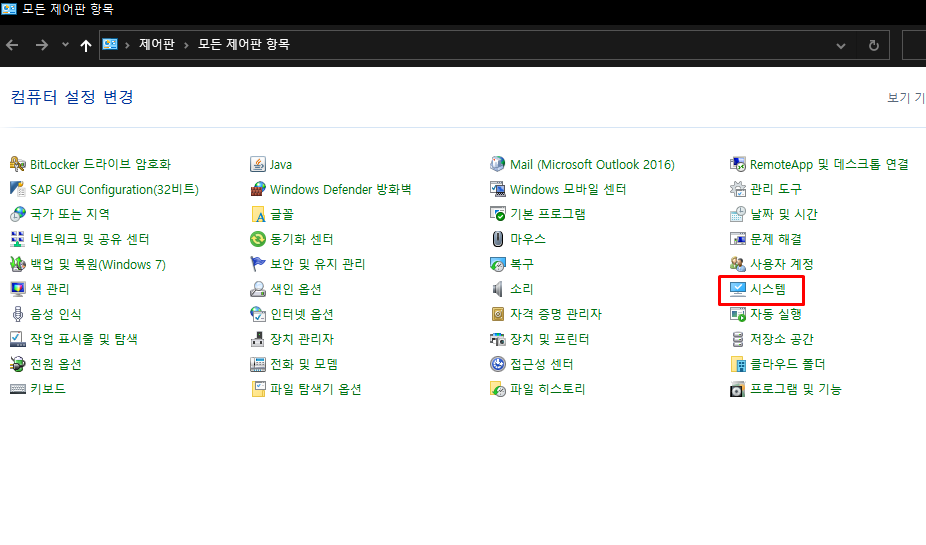
윈도우 버튼을 누르면 검색창이 뜨게 되는데 여기에 control 을 치면 아마도 cont 정도까지만 쳐도 제어판(control panel)이 보일 것이다.

그걸 클릭해 준다. 그러면 아래 둘 중에 하나의 이미지가 보인다.

image

image

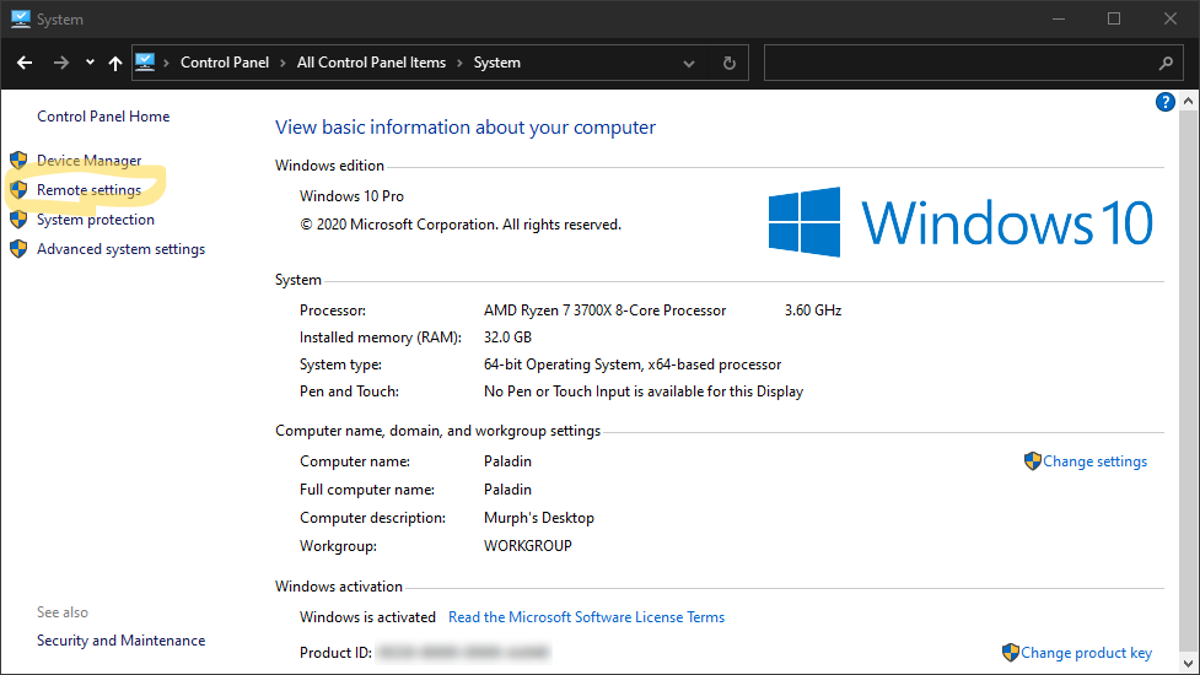
두번째 이미지가 보인다면 바로 시스템을 클릭하면 되지만 첫번째 이미지와 같이 보인다면 오른쪽 위에 View by 옆에 Category 를 클릭하여 작은 아이콘으로 보이도록 만들어주면 두번째 그림과 같이 보이면서 시스템을 선택할 수가 있다.

image

시스템에 들어가면 Remote Settings가 보이는데 이걸 클릭해 준다.

image

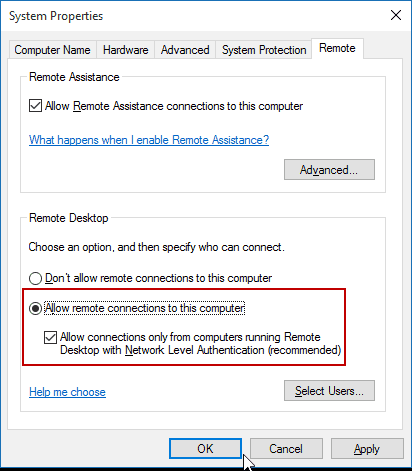
그럼 위에 처럼 나오는데 아래 체크박스는 해제해도 무방하다. 하지만 권장으로 되어 있어 나는 체크했다.

image

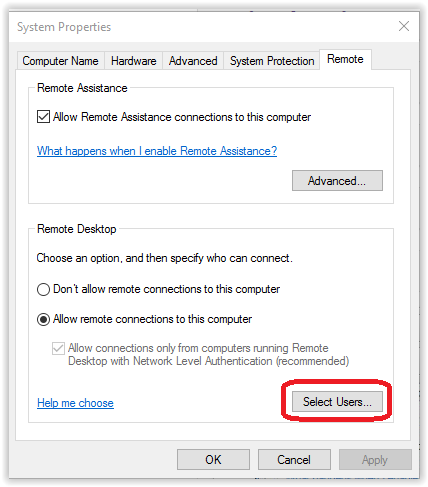
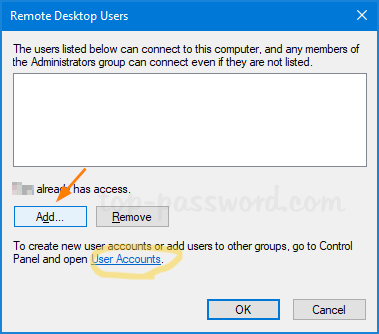
그런 뒤 select users 버튼을 클릭하면 아래와 같은 장면이 보일거다.

image

그럼 여기서 이미 사용자 계정을 추가했으면 바로 add 버튼을 눌러 사용자를 추가해도 되고 아니라면 노란색 원으로 표시한 user accounts 파란색 버튼을 눌러준다. 그런 뒤에 사용자 추가는 간단하다.

직관적으로 user, group 중 하나를 선택하는 폴더가 보이고 이 중 user를 선택해 들어가면 이미 생성된 user들이 보인다.

그럼 마우스 오른쪽 버튼을 눌러 사용자 추가 버튼을 누르면 user 이름, 비밀번호 관련 설정들을 해주면 간단히 추가가 된다.

그런 뒤 위 그림의 add 버튼을 눌러 원격 유저로 추가해 주고 확인하면 윈도우 서버에서 할 작업은 끝이다.

image

그런 뒤 본인이나 본인의 팀원들 또는 원격접속할 사람들에게 본인이 만든 계정들을 뽐내며 전달해 준다. 이제부터는 맥북에서의 접속 예시!

image

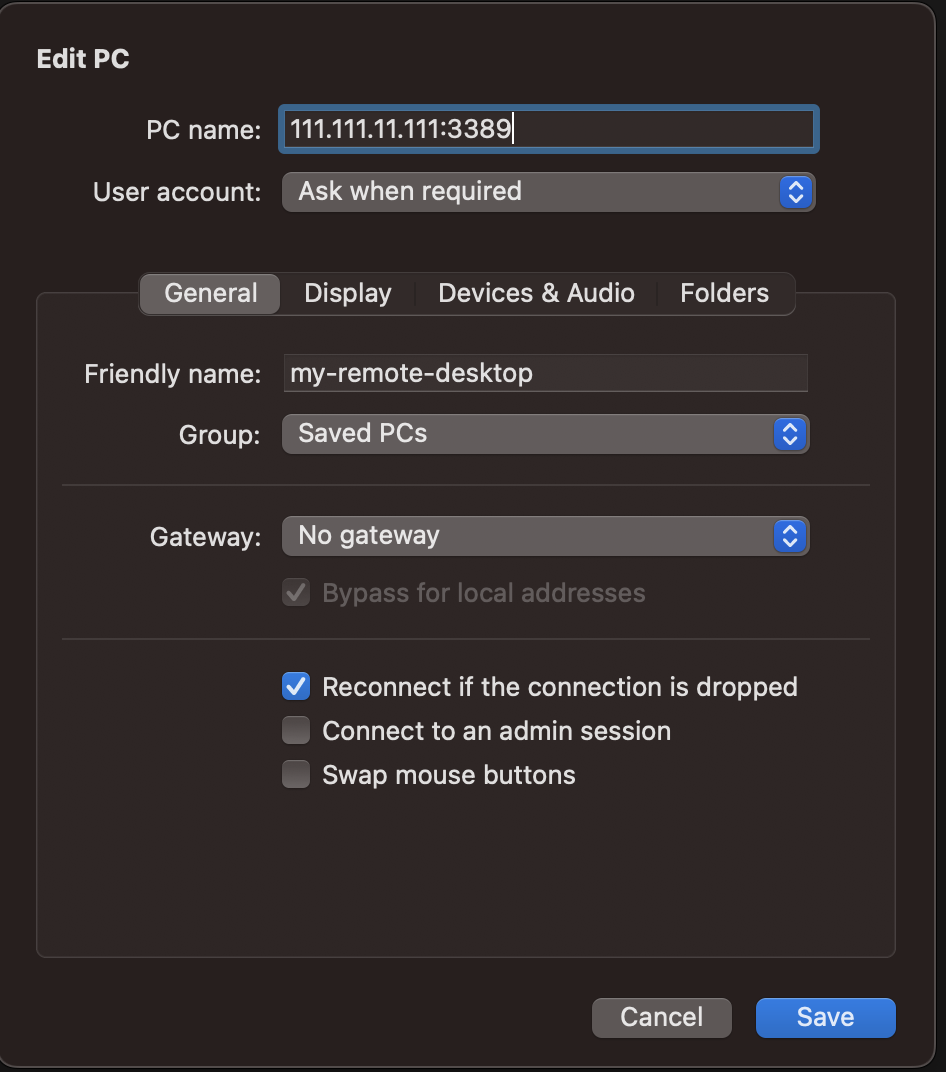
그런 뒤 위에는 맥북에서의 PC name에 윈도우 서버 [ip]:[port] 적어주고 user account 는 설정에서 미리 작성해 놓으면 된다.

그리고 friendly name은 안 써도 되는데 ip 말고 본인이 알기 쉬운 이름으로 적어두면 편하다.

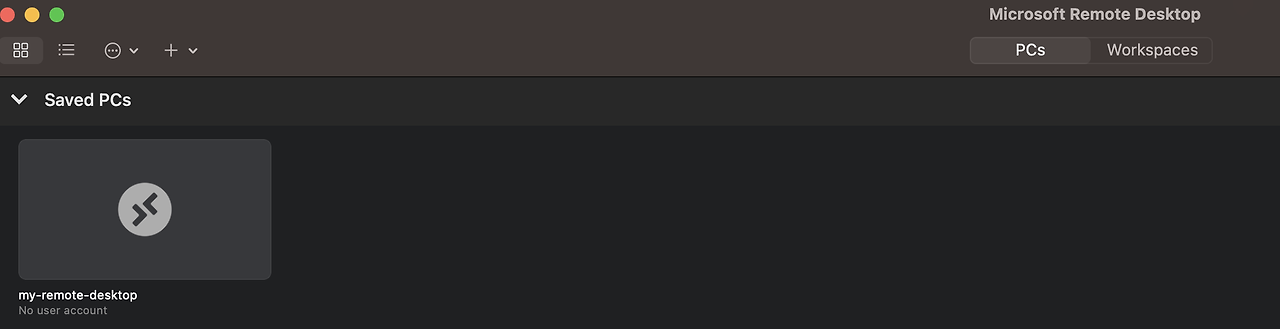
그렇게 save해 둔 뒤 접속하게 되면 위에 위에 이미지에는 빈 화면처럼 되어 있지만 접속하고 마지막 화면이 거기에 남게 된다.

이로써 당신은 윈도우 서버의 원격 접속 설정과 사용자 계정 설정, 그리고 개인 랩탑의 Microsoft Remote Desktop 프로그램을 통해 원격접속하는 방법까지 다 알게 됐다.

집에서 혼자 쓰던 윈도우를 고사양으로 쓰고 싶거나 여럿이서 쉽게 사용할 수 있게 되어 좋다.

Introduction to Django Ninja - The Future of Backend Development

· 7 min read
Alex Han
Software Engineer

image

At its core, Django is a robust, high-level Python web framework that allows developers to build complex, database-driven websites quickly and easily. However, as with any tool, there are limitations to what Django can do out of the box. That's where Django Ninja comes in.

Django Ninja is a web framework for building APIs using Django and Python 3.6+ type hints. It is designed to be easy to install and use, and provides very high performance thanks to Pydantic and async support. Django Ninja provides type hints and automatic documentation to focus only on business logic.

Why Django Ninja was Developed

Django Ninja was developed to address some of the limitations of the Django framework. For example, Django is known for its heavy reliance on the Model-View-Controller (MVC) architecture, which can be cumbersome and difficult to work with for certain types of applications. Additionally, Django is not designed specifically for building APIs, which can make it difficult to customize and optimize for certain use cases.

Django Ninja was designed with these limitations in mind. It is a high-performance framework that is specifically designed for building APIs. It provides a simple and intuitive syntax that allows developers to build powerful APIs quickly and easily. Additionally, Django Ninja is built on top of the popular Django web framework, which means that it inherits many of the benefits and features of Django, such as its robust security features and powerful ORM.

Advantages and Disadvantages of Django Ninja Compared to Django

image2

One of the main advantages of Django Ninja is its simplicity. The framework provides a simple and intuitive syntax that makes it easy to build powerful APIs quickly and efficiently. Additionally, Django Ninja is designed specifically for building APIs, which means that it is highly customizable and optimized for this use case.

Another advantage of Django Ninja is its performance. The framework is designed to be fast and lightweight, which means that it can handle high levels of traffic and is well-suited for building large-scale APIs.

However, there are also some disadvantages to using Django Ninja compared to Django. For example, Django Ninja is not as well-established as Django, which means that there is less documentation and fewer resources available for developers. Additionally, Django Ninja is not as flexible as Django, which means that it may not be the best choice for building complex, database-driven web applications.

Pros

  • Faster execution than Django.
  • Very high performance thanks to Pydantic and async support.
  • Type hints and automatic documentation for faster code writing.

Cons

  • Less community support than Django.
  • Less documentation than Django.

One of my favorite advantages of Django Ninja is that it automatically creates API documentation for Backend developers, which is the most annoying when developing.

What is Django Ninja's Auto Schema Generating Feature?

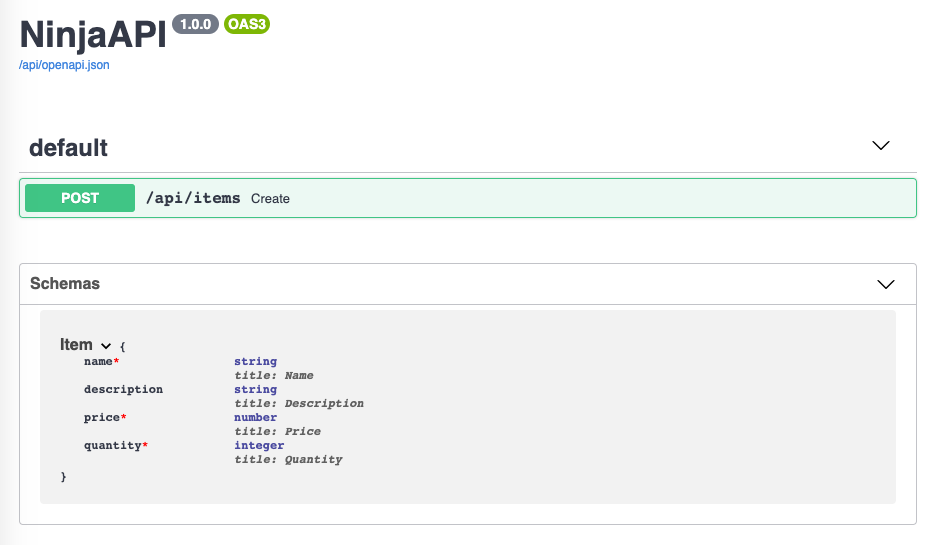
image3

Django Ninja's auto schema generating feature is a powerful tool that enables developers to automatically generate OpenAPI schemas for their APIs. This means that developers no longer need to manually write and maintain complex JSON or YAML files to describe their APIs. Instead, they can simply define their API endpoints using Django Ninja's clean and concise syntax, and the tool will automatically generate the schema for them.

How Does Django Ninja's Auto Schema Generating Feature Work?

The auto schema generating feature works by leveraging the power of Python's type annotations. When a developer defines an endpoint using Django Ninja, they can include type annotations for each parameter and response. For example, if a developer defines a POST endpoint that accepts a JSON payload with a name and age field, they can annotate the endpoint like this.

from ninja import Schema, Router

class Person(Schema):
name: str
age: int

router = Router()

@router.post("/person")
def create_person(request, person: Person):
return {"message": f"Hello {person.name}, you are {person.age} years old!"}

When the developer runs the Django Ninja app, the auto schema generating feature will inspect the type annotations and generate an OpenAPI schema for the endpoint. The schema will include all the necessary information about the endpoint, including the request and response types, status codes, and any additional metadata.

Why is Django Ninja's Auto Schema Generating Feature Important?

There are several reasons why Django Ninja's auto schema generating feature is a game-changer for API development. First and foremost, it saves developers time and effort by automating the process of generating schemas. This means that developers can focus on writing clean and concise code, rather than spending hours manually writing and maintaining complex JSON or YAML files.

Secondly, the auto schema generating feature improves the overall quality of the API documentation. The generated OpenAPI schema is always up-to-date and reflects the current state of the API. This means that developers and consumers of the API can rely on the documentation to be accurate and complete.

Finally, the auto schema generating feature makes it easier to collaborate on API development projects. Since the schema is automatically generated from the code, developers can easily share and review the API documentation without having to worry about keeping it in sync with the codebase.

How to Use Django Ninja?

To use Django Ninja, you first need to install it using pip. You can do this by running the following command in your terminal

pip install django-ninja

Once Django Ninja is installed, i can start building our API. Let's create a new Django project and app using the following commands:

django-admin startproject myproject
cd myproject
python manage.py startapp myapp

Now that i have our project and app set up, i can start building our API. Let's create a new file called views.py in our app directory and define our first endpoint.

from ninja import Router

router = Router()

@router.get("/hello")
def hello(request):
return {"message": "Hello World!"}

In this code, i'm using the Router class from Django Ninja to define our endpoint. I'm also using a decorator to specify that this endpoint should handle GET requests to the /hello path. When this endpoint is called, it will return a JSON response with a message property set to "Hello World!".

Next, i need to our project's URL configuration. In the urls.py file in our app directory, i'll add the following code:

from django.urls import path
from myapp.views import router

urlpatterns = [
path("api/", router.urls),
]

In this code, i'm importing our Router instance from our views.py file and adding it to our URL configuration. I'm specifying that our API should be available at the /api/ path, which means that our /hello endpoint will be available at /api/hello.

With our endpoint and URL configuration in place, i can now start our development server and test our API.

python manage.py runserver

If i navigate to http://localhost:8000/api/hello in our web browser or API client, i should see our "Hello World!" message. Very easy to use as above.

Conclusion

Django Ninja is a fast, easy-to-use web framework for building APIs with Django and Python. Its automatic schema generation, asynchronous support, and clean syntax make it an ideal choice for backend development. By following the code samples provided in this article, you can quickly get up and running with Django Ninja and start building powerful APIs.

I highly recommend using Django Ninja for your next backend development project, as it offers numerous advantages over other frameworks in terms of speed, performance, and ease of use.

PyTorch Lightning - Making Deep Learning Easier and Faster

· 8 min read
Alex Han
Software Engineer

image

As the field of artificial intelligence continues to advance, more and more developers are turning to deep learning frameworks to build advanced machine learning models. However, building these models can be challenging, time-consuming, and require a significant amount of expertise.

This is where PyTorch Lightning comes in. PyTorch Lightning is a lightweight PyTorch wrapper that simplifies the process of building, training, and deploying deep learning models. In this article, i will explore PyTorch Lightning in detail, including what it is, why it was created, and how it can help you build better deep learning models faster.

What is PyTorch Lightning?

PyTorch Lightning is an open-source PyTorch framework that provides a lightweight wrapper for PyTorch. The goal of PyTorch Lightning is to make deep learning easier to use, more scalable, and more reproducible. With PyTorch Lightning, developers can build advanced deep learning models quickly and easily, without having to worry about the low-level details of building and training these models.

PyTorch Lightning was created by the team at the PyTorch Lightning Research Group, which is a community-driven research group focused on making deep learning easier and faster. The framework has gained widespread adoption in the deep learning community due to its simplicity, ease of use, and ability to improve model scalability.

Why was PyTorch Lightning created?

PyTorch Lightning was created to address some of the challenges and limitations of building and training deep learning models using PyTorch. These challenges include:

  • Reproducibility: Reproducing deep learning experiments can be challenging due to the large number of parameters involved. PyTorch Lightning provides a standardized way to build and train models, making it easier to reproduce experiments.
  • Scalability: As deep learning models become more complex, they require more computational resources to train. PyTorch Lightning provides a way to distribute model training across multiple GPUs and machines, making it possible to train larger models more quickly.
  • Debugging: Debugging deep learning models can be time-consuming and challenging. PyTorch Lightning provides a way to separate the model architecture from the training loop, making it easier to debug models and identify issues.
  • Reusability: Building and training deep learning models can be a time-consuming process. PyTorch Lightning provides a way to reuse pre-built models and training loops, making it easier to build and train new models.

Features of PyTorch Lightning

LightningModule

PyTorch Lightning provides the LightningModule class, which is a standard interface for organizing PyTorch code. It separates the model architecture from the training loop and allows users to define the forward pass, loss function, and optimization method in a single module. This makes it easy to reuse code across different models and experiments.

Trainer

PyTorch Lightning provides the Trainer class, which is a high-level interface for training models. It automates the training loop, handling details such as batching, gradient accumulation, and checkpointing. It also supports distributed training across multiple GPUs and nodes, making it easy to scale up training to large datasets.

Callbacks

PyTorch Lightning provides a callback system that allows users to modify the training process at runtime. Callbacks can be used to implement custom logging, learning rate scheduling, early stopping, and other functionality.

LightningDataModule

PyTorch Lightning provides the LightningDataModule class, which is a standardized way to load and preprocess data for training. It separates the data loading and preprocessing code from the model code, making it easy to reuse data across different models and experiments.

Fast training

PyTorch Lightning uses the PyTorch backend, which provides fast and efficient training on GPUs. It also supports mixed-precision training, which allows users to train models with lower precision floating-point numbers to reduce memory usage and speed up training.

Differences between PyTorch and PyTorch Lightning
image2

Code organization

In PyTorch, users must write their own training loop and organize the code for the model, data loading, and training in a custom way. In PyTorch Lightning, users define the model and data loading code in standardized modules, and the training loop is handled by the Trainer class.

Distributed training

In PyTorch, users must write custom code to enable distributed training across multiple GPUs or nodes. In PyTorch Lightning, distributed training is supported out of the box using the Trainer class.

Checkpointing

In PyTorch, users must write custom code to save and load checkpoints during training. In PyTorch Lightning, checkpointing is handled automatically by the Trainer class.

Mixed-precision training

In PyTorch, users must write custom code to enable mixed-precision training. In PyTorch Lightning, mixed-precision training is supported out of the box using the Trainer class.

Setting Up a PyTorch Lightning Project

Before i begin, make sure that you have PyTorch and PyTorch Lightning installed. You can install them using pip, as shown below:

pip install torch
pip install pytorch-lightning

Once you have installed these packages, you can create a new PyTorch Lightning project by running the following command:

mkdir my_project
cd my_project
touch main.py

This will create a new directory called "my_project" and a new Python file called "main.py". This file will be the entry point for our PyTorch Lightning project.

Defining a Model

To define a PyTorch Lightning model, i need to create a new class that inherits from the LightningModule class. In this example, i will define a simple linear regression model that predicts the output based on the input.

import torch.nn as nn

class LinearRegressionModel(pl.LightningModule):
def __init__(self):
super(LinearRegressionModel, self).__init__()
self.linear = nn.Linear(1, 1)

def forward(self, x):
out = self.linear(x)
return out

In the constructor of the class, i define the layers of the model. In this case, i define a single linear layer that takes one input and produces one output. In the forward method, i define how the input is processed by the layers of the model.

Implementing the Training Loop

Next, i need to implement the training loop. PyTorch Lightning provides a convenient interface for training the model, called the Trainer class. I can define the training loop by overriding the training_step method of the LightningModule class. In this example, i will train the model on a dataset of random data points.

import torch.optim as optim

class LinearRegressionModel(pl.LightningModule):
def __init__(self):
super(LinearRegressionModel, self).__init__()
self.linear = nn.Linear(1, 1)

def forward(self, x):
out = self.linear(x)
return out

def training_step(self, batch, batch_idx):
x, y = batch
y_pred = self(x)
loss = nn.functional.mse_loss(y_pred, y)
return {'loss': loss}

def configure_optimizers(self):
optimizer = optim.SGD(self.parameters(), lr=0.01)
return optimizer

In the training_step method, i define the forward pass of the model, compute the loss, and return a dictionary containing the loss. In the configure_optimizers method, i define the optimizer used to optimize the model parameters. In this example, i use stochastic gradient descent (SGD) with a learning rate of 0.01.

Evaluating a PyTorch Lightning Model

To evaluate a PyTorch Lightning model, i need to define an evaluation step function that takes in a batch of data and returns the model's predictions. I can also define a separate function to calculate the metrics i am interested in.

Here's an example of an evaluation step function for a classification problem:

def validation_step(self, batch, batch_idx):
x, y = batch
y_pred = self.forward(x)
loss = F.cross_entropy(y_pred, y)
preds = torch.argmax(y_pred, dim=1)
acc = accuracy(preds, y)
self.log_dict({'val_loss': loss, 'val_acc': acc}, prog_bar=True)
return loss

In this example, i pass a batch of data and the batch index to the function. I then calculate the model's predictions using the forward function and calculate the cross-entropy loss between the predictions and the ground truth labels. I also calculate the accuracy of the model's predictions using a separate function called accuracy. Finally, i log the validation loss and accuracy using the log_dict function.

To calculate the metrics i am interested in, i can define a separate function that takes in the model's predictions and the ground truth labels:

def calculate_metrics(preds, y):
acc = accuracy(preds, y)
precision = precision_score(y.cpu(), preds.cpu(), average='macro')
recall = recall_score(y.cpu(), preds.cpu(), average='macro')
f1 = f1_score(y.cpu(), preds.cpu(), average='macro')
return acc, precision, recall, f1

In this example, i calculate the accuracy, precision, recall, and F1 score of the model's predictions using functions from the sklearn.metrics module.

Running Evaluation

Once i have defined our evaluation step function and metrics function, i can run evaluation on a PyTorch Lightning model using the trainer.test method:

trainer.test(model, datamodule=datamodule)

In this example, i pass in the PyTorch Lightning model and the data module used for testing. The trainer.test method will run the evaluation step function on the test data and calculate the metrics i defined earlier.

Conclusion

PyTorch Lightning is a powerful and efficient framework for training and deploying deep learning models. Its modular design and clean abstractions make it easy to write concise and maintainable code. With its automatic optimization and streamlined API, PyTorch Lightning simplifies the process of building and training complex models, freeing up valuable time and resources for researchers and practitioners.

I highly recommend PyTorch Lightning to anyone who is interested in developing machine learning models. Whether you're a seasoned expert or just getting started, PyTorch Lightning offers an intuitive and flexible platform for designing and implementing state-of-the-art models with ease. With its extensive documentation, vibrant community, and active development, PyTorch Lightning is sure to become an indispensable tool for machine learning practitioners and researchers alike. So give it a try and see for yourself why PyTorch Lightning is quickly becoming the go-to framework for deep learning!